




 AI Solutions



Table of Contents
A field office user is trying to open shared project files before a vendor deadline, but the folder won’t load and the approval package is stuck. Someone opens a ticket, then waits to learn whether the issue is the laptop, permissions, or the connection.
Sean Mansell, Information Technology Service Delivery Manager at Foresight for IT, notes: “Remote support works best when the technician can see the ticket history, verify access safely, explain next steps clearly, and keep the user working.”
Benefits of remote IT support matter in moments like that because help arrives quickly, users know what happens next, and work keeps moving without waiting for an onsite visit.
Remote IT Support Benefits That Show Up During The Workday
Remote support helps when everyday IT issues block work before they appear on a report.
-
Faster helpdesk access: When a finance approver can’t reach the invoice system, our average response time of about 5 minutes helps reduce stalled approvals and guesswork.
-
Less onsite waiting: Many password, software, printer, and cloud file tickets can be handled remotely, so users don’t lose a morning waiting for travel.
-
Broader device coverage: Support across laptops, mobile devices, Mac and Apple systems, and common business apps keeps mixed teams moving.
-
Clearer ticket visibility: SLAs and a support portal show priority, ownership, and next steps, which helps managers plan around real ticket status.
Benefits Of Getting Remote IT Support For Teams Outside The Main Office
Distributed teams need support that follows the work, not just the main office. Staff outside the office often depend on cloud files, mobile devices, VoIP, and shared printers to finish customer handoffs, submit daily paperwork, or keep approvals moving.
Access speed matters too. One Windows 365 study found 32% of respondents gained application and file access for new or acquired employees and contractors at least four days faster, while 51% gained one to three days.
Picture a supervisor in a remote yard who can’t scan signed delivery forms, while a coordinator’s VoIP calls keep dropping and a new Mac user needs the right software license. Our remote troubleshooting can check secure access, device settings, cloud permissions, and licensing first, then escalate onsite when hands-on work is needed.
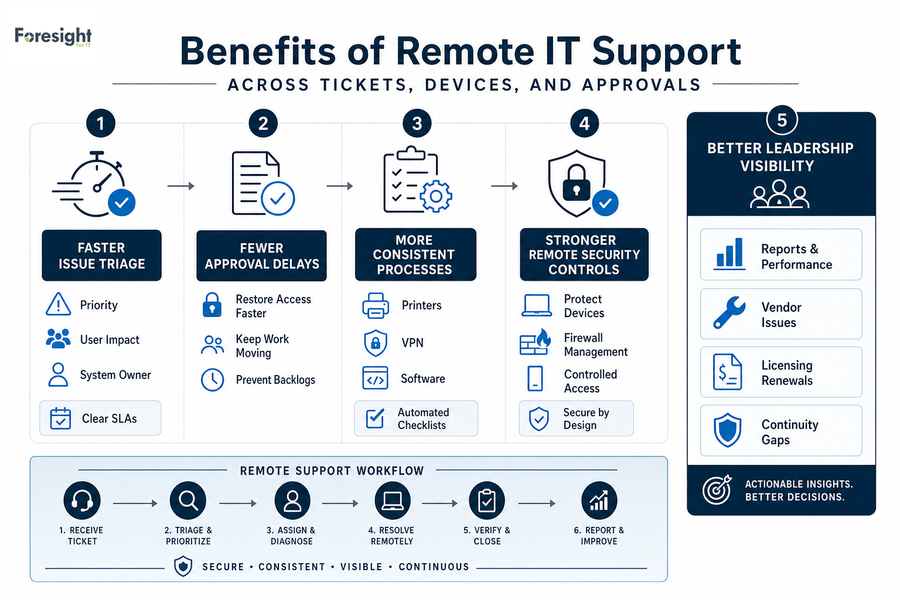
Benefits Of Remote IT Support Across Tickets, Devices, And Approvals
Remote support creates the most value when it connects to repeatable processes, clear ticket ownership, security checks, and continuity planning.
-
Faster issue triage: A payroll login ticket gets sorted by priority, user impact, and system owner. Clear SLAs reduce the time spent wondering who’s handling it.
-
Fewer approval delays: Remote help can restore access to invoice, CRM, or file systems before customer work backs up. That means fewer stalled approvals and fewer follow-up calls.
-
More consistent support processes: Automated checklists help technicians handle recurring printer, VPN, and software tickets the same way each time.
-
Stronger remote security controls: We protect laptops, desktops, and mobile devices while keeping network access controlled through firewall management.
-
Better leadership visibility: A Technical Account Manager and Strategic Technology Advisor review reports, vendor issues, licensing renewals, and continuity gaps so decisions aren’t buried in tickets.
Keep IT Support Moving
Making Remote Support Dependable In A Managed Service Model
When invoice approvals, customer replies, and daily ticket queues start waiting on IT support, the next step is making help repeatable.
Remote IT support works best when we connect helpdesk support, endpoint protection, cloud access, and firewall management to defined service levels.
For cloud and server work, a Forrester Azure analysis found that streamlined server deployment could save 40 hours of IT time per server, which shows why repeatable processes and clear ownership matter beyond simple ticket closure.
That change needs care because teams are busy, systems are already live, and security pressure is real, with 60% of respondents saying cybersecurity was the top challenge that led them to work with an MSP. The remote IT support benefits show up more reliably when the service model includes clean onboarding, clear ownership, and regular proof that the work is being done.
-
Start with onboarding: We uncover missing devices, stale accounts, unclear admin access, and weak documentation before they become repeat tickets.
-
Match service coverage: Basic, Essentials, and Complete help align support depth to operational risk and support needs.
-
Review proof regularly: Periodic reports show ticket trends, SLA performance, completed work, and areas for improvement, then we review them with an Account Manager.
-
Keep planning organized: A Technical Account Manager and Strategic Technology Advisor connect service audits, cloud plans, licensing decisions, and service improvements.
Keep Remote Work Moving
Reduce onsite delays with remote IT support that helps users resolve tickets, access files, and stay productive. Connect with Foresight for IT.
Getting The Benefits Of Remote Support Without Losing Control
A field office user gets locked out of a shared app, submits a ticket, and needs help before the next customer handoff stalls. The benefits of getting remote it support are strongest when roles, permissions, and escalation paths are clear. Remote access tools are now part of daily IT support, but they need documentation and oversight, especially when they appeared in nearly 40 percent of engagements in one incident-response report.
-
Review ticket patterns: Look at unresolved access, printer, licensing, and device tickets to spot recurring workflow blockers.
-
Document access rules: Define who can approve remote sessions, admin permissions, vendor access, and after-hours support.
-
Confirm recovery expectations: Test backups and restores so teams know which files, servers, and apps come back first.
-
Clarify shared responsibilities: In co-managed IT or staff augmentation, define handoffs between internal staff and external support, including who escalates urgent issues for incident response.
Making Remote Support Easier To Rely On
Remote IT support helps most when it’s structured around response expectations, secure access, clear tickets, reliable communication, and continuity planning. It also needs plain-language updates, so the person waiting on an invoice approval, customer file, or device fix understands what’s happening.
At Foresight for IT, we help review support gaps through practical service audits and structured onboarding, then improve remote troubleshooting through managed or co-managed IT support with onsite help when needed. Our Technical Account Manager and Strategic Technology Advisor keep service improvements, reporting, and planning organized, so the next stuck approval package has a clearer path from ticket to resolution.