




 AI Solutions


Table of Contents
An education staff member is locked out ten minutes before class while the office phone rings, a password reset ticket sits behind printer issues, and a router alert needs review. That’s when support structure stops feeling theoretical.
Leaders ask what is different about IT support tiers because the answer affects response expectations, ticket ownership, security risk, and how quickly people get back to work. Ticket volume is rising too, with 75% of customer service reps saying they saw their highest ever volume in 2024.
Vince Phillips, President and CEO at Foresight for IT, notes: “Support tiers should tell staff exactly where to go first, what happens next, and who owns the issue until work is back on track.”
IT Support Tiers Explained For Everyday Operations
Support tiers route requests to the right person, from password resets and device setup to firewall changes, cloud questions, and recovery planning after an outage. Without shared language, a “quick fix” means one thing to a helpdesk technician, another to a network specialist, and something else to the manager waiting for an update.
That’s IT support tiers explained in practical terms: each request has a first contact, an escalation path, and an owner until the work is back on track.
-
User access issues: Passwords, account lockouts, new user setup, email access, software questions, and the first plain-language update.
-
Device and app problems: Laptop issues, printers, Microsoft 365 trouble, business app errors, and Mac or Apple support.
-
Network and security work: Router support, firewall changes, endpoint protection, anti-phishing tools, network monitoring, and mobile device security.
-
Planning and escalation: Vendor coordination, cloud decisions, business continuity, compliance planning, and vCIO-style guidance.
Picture a field office that loses connectivity during morning dispatch. A helpdesk technician checks the router remotely, a higher-tier technician reviews firewall logs, and an account lead coordinates the internet provider follow-up so the office manager isn’t chasing three contacts.
At Foresight for IT, we explain support levels in plain language so users know where to submit a request, managers know what to expect, and recurring issues can be reviewed against defined processes and service level agreements.
What Is The Difference Between Different IT Support Tiers In Ticket Ownership
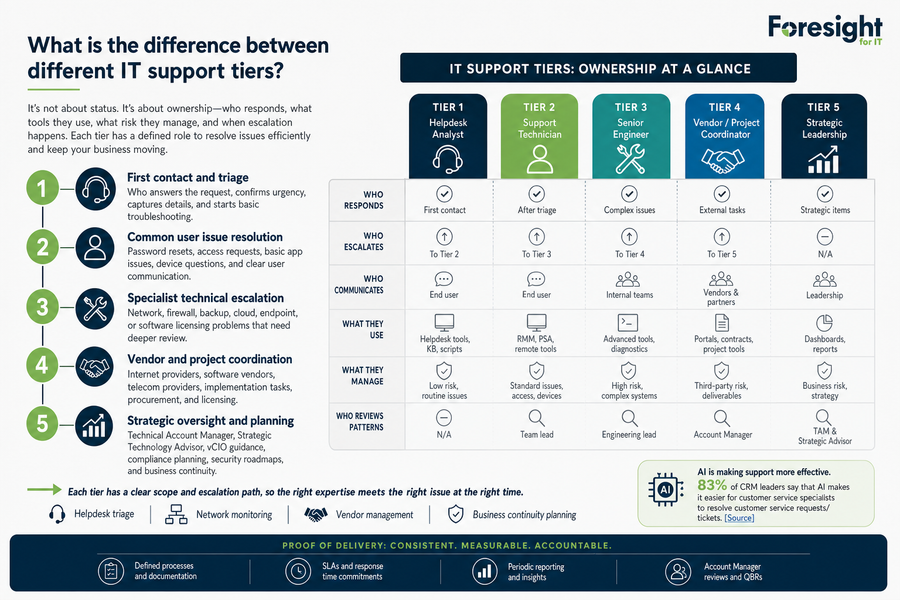
The difference is not status alone. It’s about who owns the ticket, what tools they use, what risk they manage, and when escalation happens.
When a staff member is locked out before a meeting or a field office can’t connect through a router, what is the difference between different IT support tiers becomes a workflow question: how does the issue move from first contact to resolution without losing context?
-
First contact and triage
The first responder confirms urgency, captures screenshots or error messages, and starts basic troubleshooting. Clear notes prevent the user from repeating the same story later.
-
Common user issue resolution
This level handles password resets, access requests, basic app issues, device questions, and user communication. AI and automation can help here, and 83% of CRM leaders say AI makes it easier for customer service specialists to resolve requests and tickets.
-
Specialist technical escalation
Network, firewall, backup, cloud, endpoint, and software licensing problems need deeper review. The owner changes, but the ticket history should not disappear.
-
Vendor and project coordination
Internet providers, telecom teams, software vendors, procurement, and licensing need one coordinator who tracks the handoff and updates the ticket.
-
Strategic oversight and planning
A Technical Account Manager, Strategic Technology Advisor, or vCIO role reviews patterns, compliance planning, security roadmaps, and business continuity needs. Periodic reports and SLA reviews turn ticket history into decisions that can be discussed with an Account Manager.
Helpdesk triage, network monitoring, vendor management, and business continuity planning all work better when ownership is written down and reviewed.
Tiers Of IT Support And Their Impact On Response Times
A finance team is waiting on invoice approvals because one user can’t access email or the shared accounting system. The invoice batch has a deadline, the approver is unavailable, and the manager needs to know whether to reassign the work or wait for IT.
Speed matters, but resolution clarity matters just as much. Consistent response processes reduce confusion because users know where to submit the ticket, managers know whether the issue is routine or urgent, and support teams know when to escalate. In security operations, delays have a measurable cost, with 56 minutes passing on average before anyone acts on an alert.
The tiers of IT support should help staff understand what happens after they click submit.
-
Priority setting: Urgent incidents are separated from routine requests, so an outage does not sit behind a software how-to question.
-
Clear user updates: Plain-language updates keep staff from submitting duplicate tickets or calling multiple contacts.
-
Escalation triggers: A ticket moves from first-line support to network, cloud, security, or vendor work when initial checks show a wider issue.
-
Service level expectations: Written response and resolution targets reduce uncertainty and help managers plan the next step.
At Foresight for IT, we use service level agreements, support portal access, and clear communication so support levels connect response speed with real workflow decisions.
Related IT Support Model Guides
IT Technical Support Tiers Across Security Cloud And Network Work
Support tiers become more important when a ticket touches shared systems, security controls, cloud platforms, backups, routers, firewalls, or third-party vendors. A laptop alert can become a firewall review, a backup check, and a vendor escalation if the issue affects access to a client file location or hosted app.
The value of IT technical support tiers is that each risk has an owner, not just a ticket number.
-
Endpoint and access protection
This includes antivirus, endpoint protection, mobile device security, anti-phishing, and user training guidance. During structured onboarding, we look for unsecured devices before they become recurring exposure.
-
Router and firewall support
Managed router and firewall work includes secure device settings, network monitoring, telecom setup, and documentation cleanup. Good notes shorten the next outage call.
-
Cloud and server support
Cloud consulting, server hosting, offsite support, cloud backups, and defined processes help remote teams keep working without waiting for an onsite visit.
-
Backup and recovery readiness
Business continuity planning depends on up-to-date backups and tested restores. Recent research found 759 U.S. hospitals experienced IT outages last July due to a faulty CrowdStrike update.
-
Incident investigation support
Managed cybersecurity includes monitoring, root-cause review, containment, and remediation guidance. Alert handling matters because 13% of social engineering incidents were traced back to ignored or untriaged security alerts.
Clarify Your IT Support Path
Turn support tiers into clearer ticket ownership, faster escalation, and stronger security with Foresight for IT.
Practical Steps Before You Change Support Coverage
Changing support structure takes care because staff already have habits, vendor contacts, and urgent tickets in motion. Start with the work already happening in the queue, then look at where ownership, escalation, and communication break down.
-
Map recent tickets: Review the last 30 to 60 days by type and escalation path.
-
Flag shared systems: Identify requests involving security, backups, cloud, network, or vendors.
-
Name communication owners: Document who updates users when escalation happens.
-
Review written expectations: Confirm response and resolution targets are documented and reviewed.
Choosing IT Support Tiers That Fit How Your Team Works
The right support structure gives staff a clear first contact, gives managers visibility into ticket progress, and gives leaders a practical way to plan risk, coverage, and service expectations. It also makes recurring problems easier to spot, whether they show up as repeated password resets, vendor delays, or router tickets from the same field office.
Downtime has real business weight, with the world’s 2,000 largest companies facing an estimated 600 billion dollars a year in costs. Your final decision should be based on workflow, risk, and internal capacity.
-
Review current tickets: Identify repeat issues, unclear escalations, duplicate requests, and vendor delays.
-
Match coverage to risk: Compare Basic, Essentials, and Complete service tiers based on operational need, exposure, and support coverage.
-
Clarify ongoing ownership: Decide where internal staff, co-managed IT, full-time staff augmentation, Technical Account Manager oversight, and Strategic Technology Advisor planning fit.
If you’re reviewing support coverage, Foresight for IT can help assess current workflows, identify gaps, and clarify escalation paths. We can also help select a managed, co-managed, or staff augmentation model that fits how your team actually works. Structured onboarding, SLA reviews, reports, and Account Manager conversations keep the plan visible after the decision is made. Contact us today.