




 AI Solutions



Table of Contents
When staff can’t open shared files, donor records stop syncing, field teams lose secure connectivity, remote learners miss portal access, or financial staff wait on client documents, IT Problems become service delivery issues. They show up as stalled approvals, extra tickets, missed updates, and workarounds that slow the day.
Vince Phillips, President and CEO at Foresight for IT, notes: “Track the workflow first, then the device or app, because the real cost is usually the approval, client handoff, or data update that stops moving.”
IT Problems That Interrupt Daily Work First
Poor IT performance shows up before anyone diagnoses it. You see delayed approvals, unresolved tickets, side-channel messages, missed customer updates, and inconsistent access to files that should be routine.
-
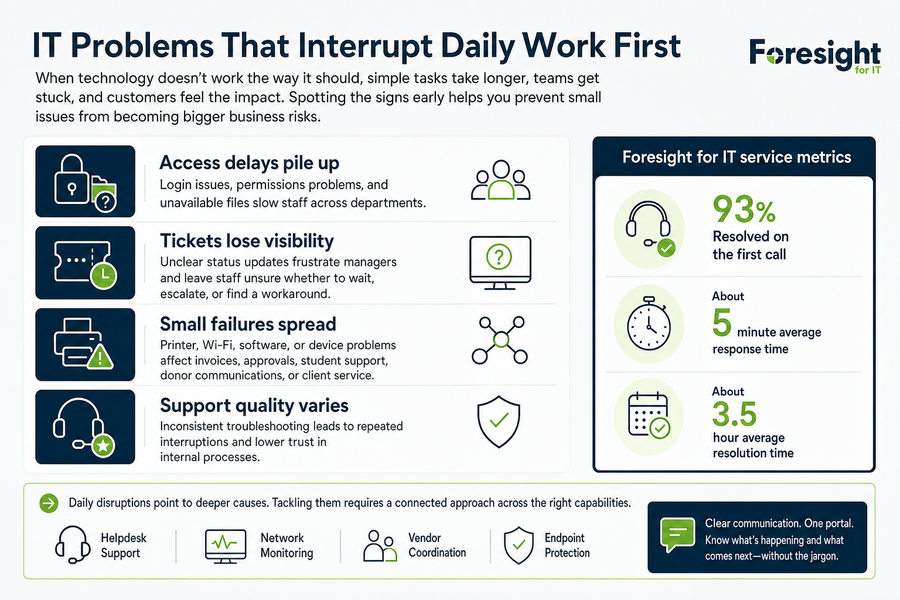
Access delays pile up: Login failures, permissions gaps, and unavailable files slow handoffs. A finance assistant waiting on an invoice folder or a case worker locked out of donor notes loses time the next person depends on.
-
Tickets lose visibility: When ticket status is unclear, managers don’t know whether to wait, escalate, or approve a workaround. Our support portal keeps requests and technician updates in one place, with plain-language next steps.
-
Small failures spread: Printer, Wi-Fi, software, or device issues quickly touch invoices, student support, donor communications, and client service. One laptop that won’t connect can hold up a field report or billing package.
-
Support quality varies: Inconsistent troubleshooting creates repeat interruptions and lowers trust in internal processes. Foresight for IT service metrics include 93% first-call resolution, about 5-minute average response time, and about 3.5-hour average resolution time.
These common technology problems usually point to deeper causes than a single broken device.
Helpdesk support, network monitoring, vendor coordination, and endpoint protection all shape whether a disruption stays small or spreads.
Common Technology Problems Behind Slow Approvals And Tickets
Repeated issues usually mean the support process is unclear, not that users keep making mistakes. When ownership, standards, and reporting are loose, technology issues in business become ticket backlogs, rework, and uncertain priorities.
-
Unclear ownership of requests. Staff lose time when no one knows whether internal IT, a software vendor, or a managed provider owns the next step. A payroll approval stuck in an app queue needs one clear handoff, not three email threads.
-
Weak device and access standards. Inconsistent setup creates permissions issues, security gaps, and slower support. Structured onboarding helps us uncover unsecured devices and access problems before they become daily interruptions.
-
Missing network documentation. Undocumented switches, routers, firewalls, and telecom links make outages harder to trace. Clear documentation lets technicians see what connects to what before staff are waiting on phones, shared drives, or dispatch tools.
-
Unmanaged vendor handoffs. Internet, phone, copier, software, and line-of-business vendors often need coordination during a fix. Without one owner driving the case, each vendor waits for someone else.
-
Limited reporting visibility. Leaders struggle to plan improvements when they can’t see ticket patterns, recurring issues, or proof of delivery. We review service reports with an Account Manager so successes, gaps, and next actions stay visible.
Domain scenario: A nonprofit coordinating donor systems can lose a full afternoon when donation records fail to sync before a campaign report. If the software vendor blames permissions and the support team lacks access history, staff recheck records by hand instead of contacting donors.
Once the causes are visible, the business impact becomes easier to size.
Service audits, vendor management, documentation cleanup, and account oversight help turn recurring issues into trackable work with clear owners.
Fix Common IT Problems Faster
Technology Issues In Business That Create Measurable Risk
A delayed ticket is rarely just a support metric. It can hold up billing, expose client data, interrupt field reporting, or leave leaders making decisions without a clear view of what is failing.
-
Downtime blocks service delivery: Unavailable systems affect client files, donor records, student portals, dispatch, and billing. For a financial firm, a locked document system can delay an advisor’s client meeting and follow-up paperwork.
-
Security gaps slow operations: Unsecured devices, weak access controls, and phishing incidents lead to containment work, password resets, device reviews, and interrupted workflows. Unit 42 reported that 86% of incidents it responded to in 2024 involved business disruption, ranging from downtime to reputational damage.
-
Compliance work becomes reactive: Missing policies, scattered documentation, and unclear data handling create stress during audits or client reviews. Compliance planning works best when evidence is organized before someone asks for it.
-
Recovery plans stay untested: Backups only matter when you know the data can come back. We plan and test restores so recovery steps are known before an outage, deletion, or ransomware event forces the issue.
-
Leaders lack planning signals: Recurring tickets and outages should feed into roadmaps, service reviews, and priority decisions. When problems with IT are reviewed in context, leaders act on patterns instead of individual complaints.
Risk gets easier to prioritize when it is tied to workflows people already understand. Managed cybersecurity, backup testing, compliance planning, and security roadmaps help connect those risks to practical next steps.
Stop IT Issues Before Work Stalls
Recurring access delays and unclear tickets create avoidable risk. Foresight for IT helps you build a clearer support plan.
Problems With IT That Need A Clear Ownership Model
Ownership clarity matters because support work crosses people, systems, vendors, and deadlines. Without agreed roles, IT problems in business keep landing on the person who answered last, not the person best equipped to resolve them.
-
Map critical workflows: List the systems that support approvals, invoices, customer service, donor engagement, learning access, field operations, and reporting. Start where staff wait, re-enter data, or miss deadlines.
-
Assign support ownership: Define who owns helpdesk tickets, vendor escalations, cybersecurity alerts, backup checks, device setup, and software licensing. Clear ownership prevents a copier vendor, cloud vendor, and internal contact from circling the same issue.
-
Set service expectations: Use SLAs so urgent requests, standard fixes, and project work don’t compete without priority rules. Our Basic, Essentials, and Complete service tiers help match coverage to operational need and risk tolerance.
-
Extend internal capacity: Co-managed IT and staff augmentation support internal teams without taking over their day-to-day role unless full managed support is the right fit. This helps one IT lead avoid being the helpdesk, security reviewer, cloud planner, and vendor manager all at once.
-
Review patterns regularly: Use reports with an Account Manager or Strategic Technology Advisor so repeat tickets become planned improvements, not background noise.
Real-world snapshot: An internal IT person may handle daily user requests well but need help with cybersecurity monitoring and vendor escalations. We can share those responsibilities while that person keeps ownership of staff relationships and local priorities.
Changing the support model affects staff habits, vendor relationships, and leadership expectations, so the rollout needs clear communication.
Co-managed IT, staff augmentation, service tiers, and account oversight give that change a practical structure instead of leaving everyone to negotiate support one ticket at a time.
IT Problems In Business Are Easier To Manage With The Right Plan
Start by identifying patterns, clarifying who owns each type of request, improving support visibility, and tying risk to real workflows like approvals, client files, remote access, and recovery steps. We review recurring issues, use service reporting to turn patterns into practical next steps, and support the work with clear communication, managed cybersecurity, cloud and network consulting, and remote or on-site troubleshooting.
If staff are still waiting on shared files, vendor answers, or unclear ticket updates, contact Foresight for IT and we’ll help you plan the next stage with the right level of support. Contact us today.